

WordPress has evolved far beyond a traditional CMS. With modern APIs and frontend frameworks, it can now function as a headless CMS. Powering fast, scalable websites and applications.
This article explains Headless WordPress from a developer’s perspective, including when to use it, when to avoid it, and how the architecture works. This content is 100% original and copyright-free.
What Is Headless WordPress?
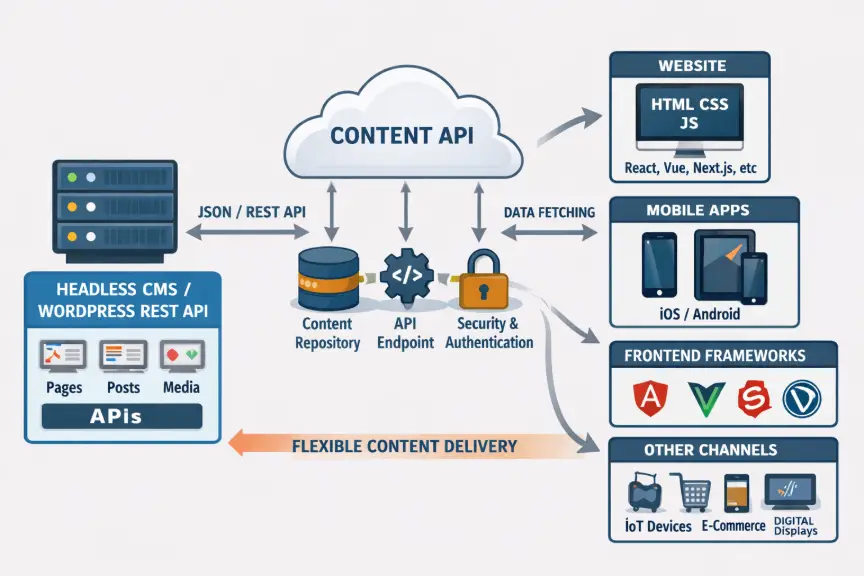
In a traditional WordPress setup, the CMS handles both backend and frontend rendering. In a headless setup, WordPress is used only for content management, while the frontend is built using modern frameworks like React or Next.js.
Content is delivered via APIs such as the WordPress REST API or GraphQL.
How Headless WordPress Works
1. Content is created in the WordPress admin panel
2. Data is exposed through APIs
3. A frontend application fetches this data
4. Content is rendered independently of WordPress themes
Why Developers Choose Headless WordPress
– Full frontend freedom with modern JavaScript frameworks
– Better performance using static generation and CDNs
– Improved scalability for large or multi-platform projects
– Increased security due to reduced public exposure
When You Should Use Headless WordPress
Headless WordPress is ideal for SaaS platforms, mobile apps, large-scale portals, and enterprise-level websites where performance and scalability are critical.
When Headless WordPress Is Not Recommended
For simple blogs, small business sites, or standard WooCommerce stores, traditional WordPress is often faster, cheaper, and easier to maintain.
SEO Considerations
SEO is not automatic in a headless setup. Developers must manually manage meta tags, Open Graph data, schema markup, and ensure server-side rendering or static generation to maintain search visibility.
Final Thoughts
Headless WordPress is a powerful solution when used correctly. Developers should choose this architecture based on project needs, not trends.
